Mitsubishi Logisnext
Runs on Opero
- AI Chat
- Knowledge autocapture
- Document processing
Triage team inboxes, filter spam, qualify leads, route service requests and prepare grounded replies from your documents, previous emails and connected systems.
From message to next step
Opero reads the thread, identifies the request, checks company systems, and prepares a grounded reply for review.
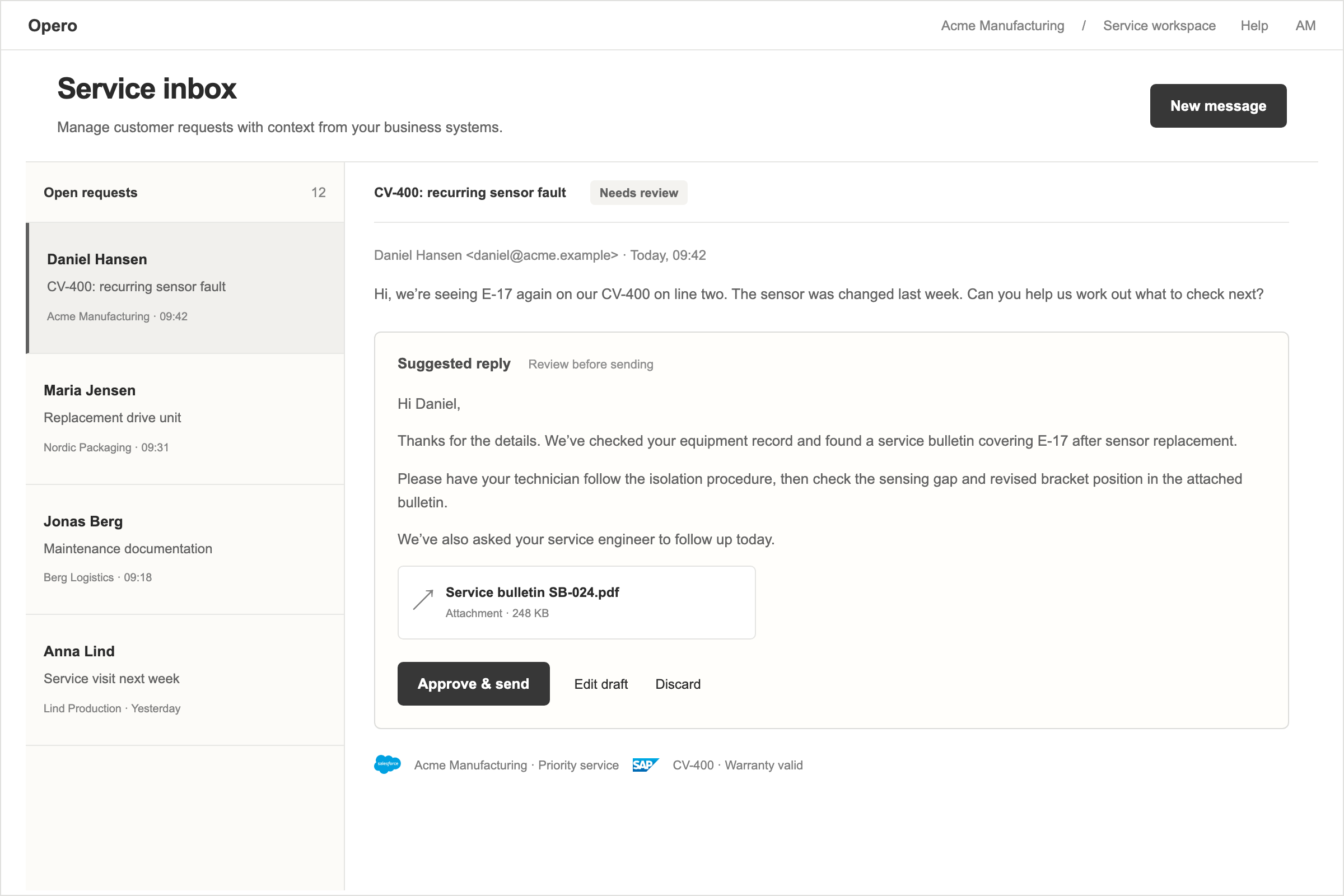
A shared inbox mixes support requests, sales enquiries, supplier updates, internal questions, mailing lists, and spam. Before anyone can solve a problem, someone has to read each message, work out what it is, find the right information, and decide who should handle it.
Opero gives the team an AI email inbox on your own domain. It reads the complete thread, identifies what the sender needs, and moves the message to the right next step.
Opero can:
The inbox can use your documents, useful previous conversations, CRM, ERP, and other connected systems. The answer is based on the information your company already trusts, rather than a generic response from the public internet.
Different teams need different levels of control. A support team may allow Opero to send a routine answer automatically when the source is clear. A sales team may require a person to review every first reply. A finance inbox may allow classification and routing but no automatic sending.
You set those rules per team. Opero can:
Replies come from the team inbox and keep the existing recipients in the conversation.
Important information often remains inside one mailbox. Opero makes it reusable:
Save an attachment. Add a drawing, specification, label photo, service report, or signed contract to the knowledge base.
Save a conversation. Turn a useful email thread into a document so the next person can find the answer without searching somebody else’s inbox.
This means the inbox gets better at helping the team without relying on one person to remember every previous case.
Customer support. Identify the product and issue, check the manuals and previous cases, then draft an answer or open a service case.
Sales qualification. Extract the company, product interest, location, timing, and other useful details, check the CRM, and route the lead to the right salesperson.
Supplier updates. Match a delivery notice or order change to the correct purchase order, update the relevant system, and notify whoever is affected.
Internal requests. Turn a request sent to finance, operations, or HR into a structured task with the relevant details attached.
Customer and lead details can come from your CRM. Orders, invoices, and product information can come from your ERP. Documents can come from SharePoint or your Opero knowledge base. The inbox can also start an AI workflow when the request needs several steps or an approval.
See the full connector list at Integrations.


Runs on Opero
Runs on Opero
Runs on Opero
Runs on Opero
“It genuinely works. When I chat with it, I get the knowledge I need — instead of calling the office and asking a hydraulic engineer. When it comes to solving a specific problem…”
Runs on Opero
“A technician with limited product knowledge found the right solution through the Opero AI agent and resolved the issue without interrupting a colleague who was out with customers…”
Runs on Opero
Runs on Opero
Runs on Opero
“It is a true pleasure collaborating with Opero, who deliver AI solutions of the absolute highest quality. Their deep technical expertise combined with a fantastic understanding of…”
Runs on Opero
Runs on Opero
Runs on Opero
Bring one fault that keeps coming back. We run it through Opero with you.