Mitsubishi Logisnext
Runs on Opero
- AI Chat
- Knowledge autocapture
- Document processing
Connect the steps, systems, AI decisions and human approvals behind service intake, warranty checks, preventive maintenance planning and order preparation.
Inside Opero
Follow a service request through customer and parts lookups, document retrieval, a drafted reply and approval. Enlarge the example to explore the workflow.
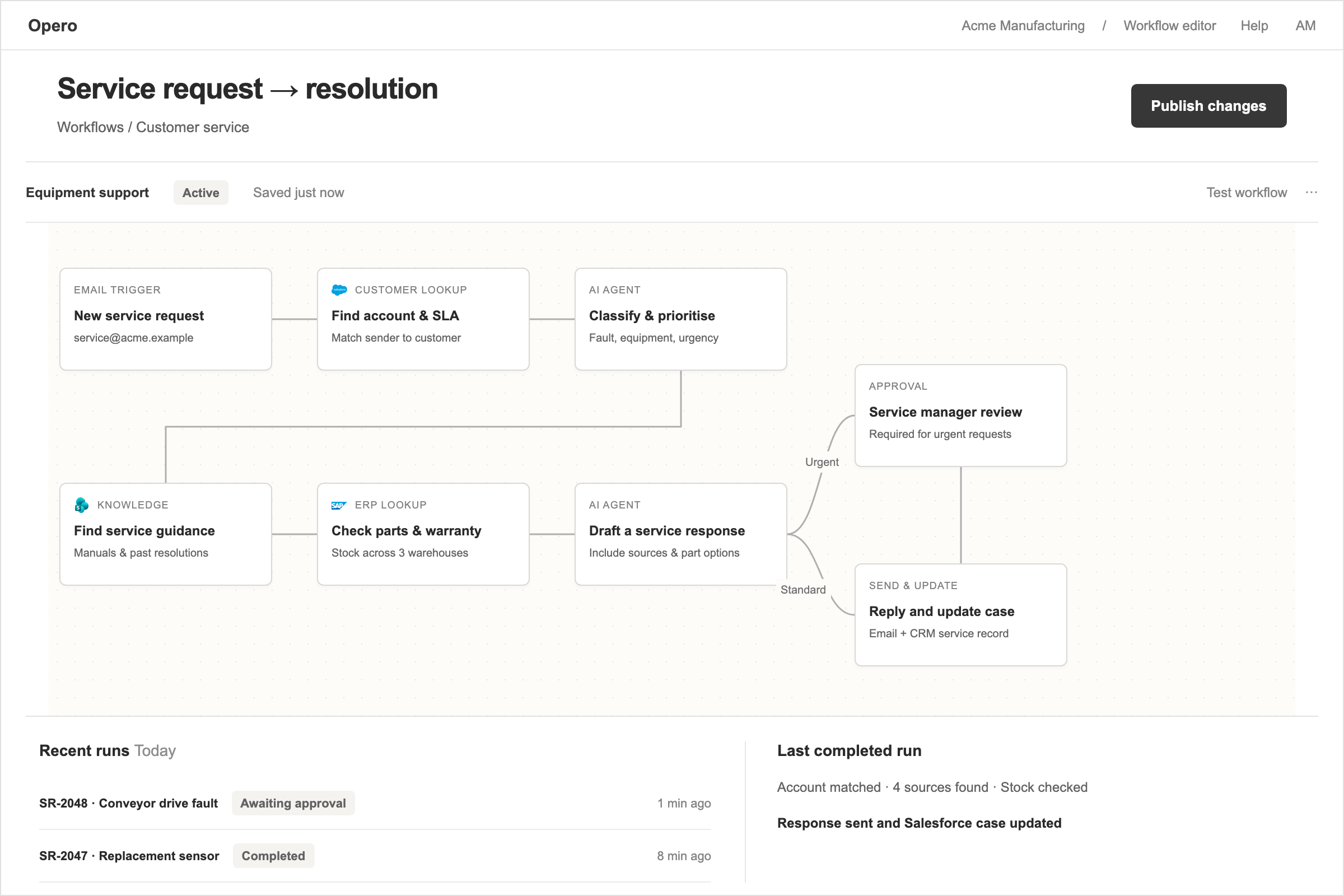
Many processes are difficult because someone must read a request, find information in several systems, decide what happens next, copy details into another tool, and ask the right person for approval.
Opero turns those steps into a workflow. Routine work happens automatically, while decisions involving risk, money, customers, or uncertainty can still wait for a person.
Tell Opero the outcome you need in plain language. For example:
When a job is marked complete, collect the expenses, check that the required information is present, and prepare an invoice for approval.
Opero drafts the steps and connections on a visual canvas. Your team checks the logic, changes any rule, and decides where approval is required before activating it.
You can also build directly with more than 100 ready-made actions. See the console in Build a workflow yourself, or ask AI to start it.
A workflow can start from an email, schedule, form, phone call, or change in another system. It can read documents and records, turn unstructured information into useful fields, check business rules, create or update records, request approval, and notify the next team.
This improves a real process from beginning to end instead of automating one isolated click.
A field-service job is marked complete in Microsoft Business Central. Opero checks that the work description, time, materials, and expenses are present.
If something is missing, it asks the responsible person. When the record is complete, Opero prepares the invoice lines and creates a draft in e-conomic. A finance employee reviews it before it is sent.
The workflow removes chasing and copying but leaves the commercial commitment with the team.
A monthly maintenance window opens for equipment at three sites. Opero checks the asset register, service intervals, locations, technician skills, and required parts.
It prepares a schedule, parts list, and technician assignments. The coordinator resolves conflicts before appointments are confirmed instead of building the entire plan by hand.
You choose which actions Opero may complete and which must pause for a named person. A workflow may prepare a purchase order but require approval above a spending limit, or draft a customer reply but wait for a manager when safety or warranty is involved.
Opero does not allow workflow steps that delete records. Read access is the default, and permission to change information is granted for each system and action.
Each run shows the completed, current, and next steps. If something fails, Opero explains the problem in plain language and can notify the responsible team.
The history records information used, actions completed, changes made, and people who approved or rejected a step.
Your team can create workflows on the canvas. For an important first process, we can map and build it with you: what starts it, which information is checked, who decides, where delays occur, and which system holds the final record.
The workflow is tested with real examples before activation.
Opero connects to SAP, IFS, ServiceNow, HubSpot, Microsoft Dynamics, IBM Maximo, Outlook, Slack, and other systems. See Integrations.


Runs on Opero
Runs on Opero
Runs on Opero
Runs on Opero
“It genuinely works. When I chat with it, I get the knowledge I need — instead of calling the office and asking a hydraulic engineer. When it comes to solving a specific problem…”
Runs on Opero
“A technician with limited product knowledge found the right solution through the Opero AI agent and resolved the issue without interrupting a colleague who was out with customers…”
Runs on Opero
Runs on Opero
Runs on Opero
“It is a true pleasure collaborating with Opero, who deliver AI solutions of the absolute highest quality. Their deep technical expertise combined with a fantastic understanding of…”
Runs on Opero
Runs on Opero
Runs on Opero
Bring one fault that keeps coming back. We run it through Opero with you.